The 5 Stages of Writing on a Deadline

We’ve done a lot of serious posts lately here on Nightwolf’s Corner. Awesomely helpful, yes, but serious. So this week, I wanted to mix it up and create something humorous. But as I was busy dusting off my sarcasm, gearing up for a good old-fashioned snark-fest, I stumbled on a fortuitously timed post by one of my favorite, soon-to-be-famous authors. See, he’s a snarky son-of-a-gun too, and while I could have put my rusty skills to good use, he beat me to the punch. He even used a similar topic to my as-yet-unwritten post. So either he somehow magically hacked into my brain, or it’s that “great minds” phenomena we always hear about. Either way, his post had me ROFL-ing, LOL-ing and all those other acronyms for laughing we never say in real life. So I thought, why not share it with all of you? You’ve hung around me long enough that I’m sure you’ll appreciate the brilliance of his wit as much as I do.

Next week, I promise, original material is coming your way. I’ll be dissecting the anatomy of a short story in the literary equivalent of science class. But in the meantime, take a break from the serious and enjoy!

I present to you: Drew, master of sarcasm. Take it away, Drew!


Photo of Drew Hayes


The 5 Stages of Writing on a Deadline

By Drew Hayes

 
Writing, much like grief, moves in phases. The ideal process for artistic creation is the slow, gentle growth of an idea, watching it bloom from mere idle thoughts into a cohesive, beautiful flower. Then, of course, there’s writing on a deadline. This process is more akin to trying to steer a lawnmower while your drunken uncle fights you for the wheel and a swarm of honeybees swoops about, rightfully angry about the beer bottle your aforementioned uncle threw into their hive. (If this analogy made no sense to you, congratulations on not living in the country.) Point being, writing on a deadline is a crazy, often senseless process that feels as though you’re being swarmed by painful distractions. Though, to be fair, in a perfect analogy you’d be the drunk uncle. But I’m getting ahead of myself.
 

Stage 1: Stupidity, a.k.a., I Can Totally Handle This

 
This is a beautiful stage, a wonderful place that you’ll find yourself at time and again. You’ve found a project that you’re suited for and been accepted into the position. You have zero fear you can handle this, because the magic of repression has given you the power to block out what your last project was like. You do everything right in this phase; you make an outline, schedule time specifically dedicated to work on this project, and even make a step-by-step checklist. You are fearless. You’ve got this shit down cold.

In fact, you’ve got it down so cold, you’re not even stressing about it. Until that window you set up to work on the project gets chomped away by angrier, more demanding tasks that are further along in the process and soon, all too soon, you’ve hit crunch time. Now you really need to write. So you finally enforce that window and sit down to truly punch out stuff on the keyboard.
 

Stage 2: Holy Shit, a.k.a., What Was I Thinking?

 
Nothing. Not one idea. Come on, you can do this. You had a billion ideas when you took on the project. There has to be one left in your brain. Just one. You’ll do anything. Come on. Focus. Foooocus. Don’t look at the spot on the wall. It’s not mold. Because you live in a dry climate and mold doesn’t look like finger smudges, that’s how I know. And now you’re cleaning the “mold” even though that’s totally not what it was. Feel better? Oh, hey, idea! No, not about the project, but related to the project. Remember that outline you did? Maybe there are some ideas in that.

Huh . . . this is wordy, detailed, and totally useless. Look at Point #4: draw out deeper meaning of previous subject. They’re all like that. Everything hinges on something else, and there’s no start point. Okay, deep breaths. At least you’ve got a plan if you do ever think of a starting point. Look, there’s an old truth to writing that if you’re stuck, just write anyway. Just put words down and sooner or later something cohesive will form. Type gibberish if you must, just type something.
 

Stage 3: Desperation, a.k.a., Shit’s ‘Bout To Get Real

 
Well, it’s the last day before the project is due, and you’ve written 30,000 words of gibberish. I’ll be honest, I’m impressed with the dedication, though I had hoped eventually real words might come out. Still, let’s not give up hope yet. Maybe you can still pull something off. I mean, you’ve done this before. Go look at notes from old projects. Perhaps the secret to breaking through your block lies in there.

Wow . . . these are . . . wow. I’m around ninety percent sure having this combination of words written down is a felony, along with a serious cry for help. Also, a good half of that isn’t English. Scratch that, it isn’t even language, at least nothing a healthy mind could identify as such. No, don’t throw it out, there are children in the world who could stumble across this. Burn it. Cleanse it with fire and hope there can be forgiveness in your next life. Only when that’s done can we continue to scour for the key to unlocking inspiration.

Okay, those pages are gone, though it took them a curiously long time to burn, and the whole house smells like smoke and regret. After a bit more digging, you’ve found different sets of notes from your last project. Let’s take a gander and see what you’ve got.

Cursing.

Cursing.

Teardrop stains.

Enthusiastic cursing.

A cocktail recipe.

Eh, what the hell, seems like as good a time as any to progress to the next step.
 

Step 4: Booze, a.k.a., Hang On Just A Minute . . . I Know What I’m Talking . . . Here Shush . . . Just Let Me Say One More Thing And I Will — Zzzzzzz

 
If it was good enough for Hemingway, it’s good enough for you. Furiously hurling vodka down your throat like there’s a gasoline fire in your belly and you have no concept of how putting out a fire works, you take an alcoholic wrecking ball to your sober consciousness. Soon the ideas begin to flow. Unfortunately, they aren’t ideas directly related to the project you’re working on. No, texting your ex is a bad idea; they don’t want to hear from you. I don’t care how unhappy you think they looked in their wedding photo on Facebook, they don’t want to hear from — aaaand you’re texting anyway.

Several drinks later, you’ve worked through nearly all the alcohol stocked in your meager bar, save for the break-in-case-of-emergency last resort: Tequila. You know you shouldn’t do it, but by Faulkner you’ve come this far, and, at this point, you’d rather go down in flames than burn away gently. You guzzle straight from the bottle, downing the well-grade liquor in less time than it took for the under-paid clerk to slap it on the sale shelf. This is going to be bad.

The next few hours pass in a blur. Only snippets and highlights will remain once the alcohol has run its course:

You remember trying to order a pizza on the phone, only for the clerk to consistently reiterate that you have dialed a dry-cleaner. You are not fooled by his lies.

You know you uploaded a clip to YouTube. Unfortunately, you have no memory of what was on it, the name it was under, or even the account you used to post it. You will spend the next six months trying to find it and/or hoping you cannot be identified by the footage. That hope will eventually be dashed.

You fill more pages with the cursed writing, the arcane script that made those previous pages so difficult to burn. This time you hide them so that your sober-self cannot unmake your hard work. There can be no more interruptions, not with the rising so near.

You sit down at your computer, staring at the monitor that mocks your literary impotence with an unsullied white screen. You stick your tongue out at it. This is the last memory of the night.
 

Stage 5: Completion, a.k.a., Who The What Now?

 
As you rise slowly from the keyboard, you immediately become aware of three things. Firstly, you have a headache that would send lesser drinkers to their graves. Secondly, you slept with your face on the keyboard and will wear this waffle iron-esque mark of shame for several hours. Lastly, and most importantly, your project is complete. The crisp, neatly edited words stare back at you from the monitor, all mockery quieted. You read through them just to be sure, but everything is germane to the topic, well-worded, and grammatically correct.

You send it off to the client without asking too many questions. Better not to know, you assure yourself. Better not to ask what exactly those pages you wrote signify. Better not to wonder just what it is you might have traded away in a fit of drunken desperation.

Nope, instead you’re off to get a shower and a well-deserved bagel. Maybe you’ll even go see if there are any new projects you might be a good fit for. After all, with this beast done, you’ve got a lot of free time, and you really should try and stay productive.

***

For more of Drew’s deadpan hilarity, please check out his author page and follow him on Twitter.
Also, keep an eye out for his side-splitting debut novel, The Utterly Uninteresting & Unadventurous Tales of Fred, The Vampire Accountant — available Summer 2014!!!

I’d also like to send a special thanks and shout-out to V of Veronica Park’s Space for letting me syndicate this post from her fantastic When Writers Go Wrong Series. She’s got a bunch more, so if you enjoyed this one, head on over and check out the others. They’ll be running through the end of December. 🙂

From the Editor’s Desk: Echoes of Balance by Cally Ryanne

As an editor, (both freelance and under REUTS Publications), I have the wonderful opportunity to see amazing novels during their developmental phase. And I wanted to find a way to share them with all of you as they became available. (I also wanted to find a way to help support the authors that trusted me with their manuscripts.) So think of these posts as my own personal book recommendations, straight from the editor’s desk.

This week, I’m excited to bring you the first title releasing under the REUTS Publications name:
 

Echoes of Balance

by Cally Ryanne


Echoes of Balance by Cally Ryanne


For Chloe Moraine, fighting wild bears — and the occasional vampire — is a better pastime than the tediousness of keeping the universe in balance. But balancing is the family business. It comes with being one of the last in the ancient line of Naimei.

So when the impending return of the Original Demons threatens global harmony, Chloe is obligated to help. Even when that means the dull-as-dirt task of following a human girl who “might be involved, maybe,” instead of the thrilling hunt she craves.

With their powerful magic and ancient Ways, Chloe’s family is unconcerned, certain they’ll quickly fix the imbalance while she’s preoccupied with human high school. But when the Ways start to fail, the threat becomes more serious, and the only person that seems to know anything is a debonair vampire with an offer to help.

If Chloe chooses to trust him, and the darker side of the supernatural he represents, she’ll betray her family and risk losing them, and herself, in the process. But if he’s right, he may just be their only chance to stop the return of the Originals and save the world.

Maybe high school won’t be so boring after all.

 
Echoes of Balance is the first in The Ways Trilogy. Featuring a cast of sarcastic, quick-witted characters, and an interesting twist on the paranormal creatures we all know and love, this YA, urban fantasy debut is fast-paced and fun. It introduces us to Chloe, one the few remaining Naimei (a new race of paranormal creature unique to Cally’s world) who passes her time as a vampire hunter. At least, until a grievous injury to her arm leaves her sidelined and her cousin shows up with sinister news. The Ways (an instrument the Naimei use to predict world events and maintain the balance of the universe) are severely unbalanced, pointing to the catastrophic return of demons that had been banished from the world centuries ago. And they (the Naimei) need Chloe’s help to stop it.

However, what they have in mind isn’t quite what Chloe expects, and instead of being sent on a high-intensity mission, she finds herself in high school, charged with following a human girl who may be involved. Frustrated at being benched yet again, Chloe decides to find her own information on the scenario, leading her to Sam — a young vampire who’s more puppy-dog than anything else; Josef — the debonair vampire who speaks in riddles and mystery; and Ducante — a wise-cracking bar owner and bona fide demon. All while navigating the social landmines of high school.

Cally’s style is smooth, with a simplicity and elegance that allows readers to become engrossed in Chloe’s world, and her storytelling is deceptively straightforward. Like Chloe, readers will find themselves unraveling an intricate web of plot lines and clues, until finally, everything falls into place. Do Chloe and the Naimei figure it out in time to stop the impending demons’ return? You’ll have to read and find out. 😉

And, because today is Black Friday, REUTS has decided to honor the shopping tradition by offering the chance to pre-order Echoes of Balance. The official release date is December 17th, but you can reserve your copy now through the REUTS Publications website. This is exclusive to the REUTS site, so don’t miss out! (Echoes will be available via the regular online channels after 12/17/13). Head on over to the book’s page, check out the first chapter for free and reserve your copy!

You can also learn more about the series and Cally by visiting her website: Ducante Originals.

Cally, it’s been a pleasure working with you. Thank you for letting me be a part of your book’s journey. I wish you all the success it deserves and look forward to the next installment! 🙂

How to Judge a Book by Its Cover

After spending the past several weeks learning the ins and outs of cover design, I found myself thinking more about the other side of the fence — the buyer’s side. I tend to browse bookstores rather aimlessly, as I’m sure a lot of us do, waiting for something to pop out and grab me. We’ve always been told, “Don’t judge a book by its cover.” But that’s exactly what we do. We can’t help it; it’s instinct, a way to filter the walls and walls of choices and prevent information overload. What actually makes a cover design stand out against the others, though? What hidden information are we subconsciously told in a glance? We saw glimpses of it during Ashley Ruggirello’s excellent series, but I wanted an opinion from outside the design world, from someone whose job isn’t necessarily to create the covers, but to judge them.

So I recruited Elizabeth Watson. Some of you may recognize that last name from a post I wrote back in May announcing the release of A Foundation in Wisdom, and you’d be correct. Elizabeth is Robert’s wife. But more importantly, she’s a librarian. She faces the same predicament we do when stepping into a bookstore, just on a much larger (professional) scale. So stick around, listen to her tips for deciphering the subtle language of book covers, and then be sure to check out A Foundation in Wisdom!
 

How to Judge a Book by Its Cover


By Elizabeth Watson

 
As Kisa mentioned, I’m a librarian for a small, rural library. My job duties include purchasing books (monthly) for the library and recommending titles to our patrons. As a librarian, I feel it’s important to know your community and what they like/want to read. But obviously, I don’t have time to read every book out there, and there are some genres that appeal to me more than others. So how can I tell whether or not to buy or recommend a title? By looking at its cover. Publishers put a lot of time and money into the cover design, so take advantage of it.

Here are some things I tend to look at while making my decisions:
 

The Title and Cover Art:

 
The cover will let you know the genre. For example:
 
The Sum of All Kisses by Julia Quinn
 
You can tell this is a romance. (And, by the way, a good rule of thumb is: the more skin showing on the cover, the more sex scenes you’ll find inside.)

Whereas this:
 

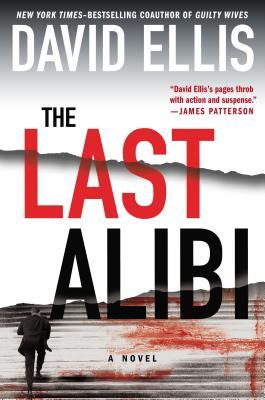
The Last Alibi by David Ellis

 
…clearly isn’t. Based on the endorsement from James Patterson and the imagery, it’s safe to say The Last Alibi is a suspense novel.

The cover can also give you a hint about location. For example:
 

Discretion by Allison Leotta
 
If you recognize the building on the cover of Discretion, you can tell it takes place in Washington, D.C.
 
The Bone Bed by Patricia Cornwell
 
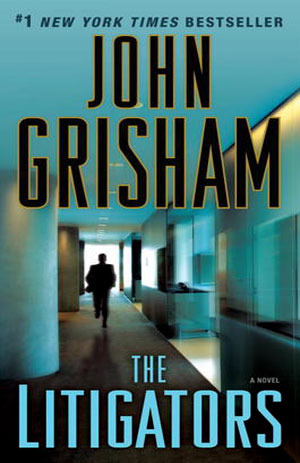
The Litigators by John Grisham
 
Also, pay attention to the presentation of the author’s name; the more real estate it takes up, the more likely you are to be looking at a famous, established author (as illustrated above).
 

Author Recommendations:

 
Getting endorsements from established writers can really help sell your book.  If the book you’re looking at has author recommendations and you’re familiar with that author, you can probably safely say the book in your hand will be similar to those written by the endorser. For example:
 
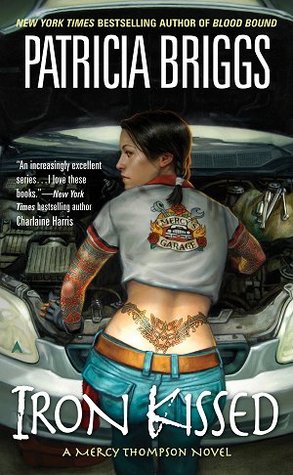
Iron Kissed by Patricia Briggs
 
Charlaine Harris writes paranormal romance, so you can guess that Iron Kissed is probably a paranormal romance, too.  (I would say it’s also safe to guess that the main character isn’t very quiet and conservative based on the tattoo.)  But if you don’t have a famous author to provide you with a quote, quotes from reviewers are helpful, too.  I just recommend making sure the quote tells the reader or purchaser what to expect from the book — should they expect a lot of action? Courtroom drama? Vampires? Fantasy?
 

Awards or Prizes:

 
The Replacement Child by Christine Barber
 
As a reader/purchaser, I definitely pay attention if a book has received a prize. A few examples of awards given to authors are the Edgar award for mysteries, the Christy award for Christian fiction, and the RITA award for romances. Being nominated is impressive even if you didn’t win, so you should brag up your nomination on the cover, too.
 

Additional Things that Factor into Purchasing:


  • Patron requests — if one of our patrons asks for it, I try to buy it.
  • Variety and diversity — I try to get something for everybody, something to represent all the genres. And, of course, I try to buy the big-name, bestselling authors when they come out with a new book.
  • Local authors.
  • Reviews — the Library Journal, Kirkus Reviews, newspapers, and other print sources are helpful. I also look at online reviews at Goodreads, Amazon, and Fantastic Fiction, as well as BookPage, and BookReporter. And I buy the Oprah’s Book Club selections and books that get reviewed in O: The Oprah Magazine.
  • If we have some books in a series, I will try to complete it.
  • Impressive covers with good reviews or endorsements from famous authors.
  • Local Book Club Requests — book clubs often tell me what title they’re planning to read next, and I’ll buy copies of their selection for the library.

Well, those are my thoughts. I hope you find them interesting and useful. The world of cover design is an intricate thing from start to finish. A lot goes into the design side, but nearly as much goes into the decision to buy. If you keep some of these key elements in mind while you create, I’m sure you’ll be able to wow the world with your covers.

Designing a Book Cover: Conclusion

Welcome to the 7th and final installment of Ashley Ruggirello’s guest post series on cover design.

For those just joining us, meet Ashley, Creative Director/Founder of REUTS Publications, and owner of freelance design company, Cardboard Monet. She’s been sharing her design expertise, taking us through the process behind designing a book cover. From inception to finished product, she’s illustrated the collaborative steps authors and designers go through, using my nemesis WIP as the guinea pig. And today, we’ve reached the end.

Know what that means? That’s right, next week I’ll be revealing the announcement I’ve been teasing you with since the beginning. I’m pretty excited about it, and hope you will be too. So follow along as Ashley walks you through the finishing touches on Unmoving‘s design and get ready for next week’s surprise! 😉
 

Chapter 7: Unmoving Tutorial Finale


By Ashley Ruggirello

 
The end is near. We’ve entered the closing chapter of our Book Cover Art Series! We started the series with an idea, something abstract and intangible. After playing around with that idea, and different forms of representation, the final cover was revealed. And, if you’re interested in how the cover was created, Chapter 5 and Chapter 6 have documented that process. But now, the time has come to put the finishing touches on the Unmoving cover, and close the book on the wonderful journey we’ve taken together.

Last, but not least . . . the necklace.

Picking up from last week:
 
Screen Shot 2013-10-28 at 7.17.54 PM
 

And again, the basic design elements


Part III: Step-By-Step Tutorial for the Unmoving Book Cover

 
Open the Necklace inspiration image in a new browser tab. You don’t need to pull it into Photoshop, just have it easily accessible to reference. In a new layer, above all the background/bench layers, zoom in and draw with the brush tool (“B” on your keyboard to bring it up). It doesn’t matter what color you use, but remember to keep the brush sharp:
 
Screen Shot 2013-11-04 at 7.31.17 PM
 
Before I show how it looks on my screen, we’ll have to add some FX to the necklace base. Remember the button? Make sure you have the necklace layer selected, and from the toolbar at the bottom of your layer window, click the FX icon and select “Drop Shadow”: (We’ll start with Drop Shadow, but we’ll be adding a couple different effects in one swoop.)
 
Screen Shot 2013-10-28 at 6.40.00 PM
 
Screen Shot 2013-10-28 at 7.09.34 PM
 
This’ll open the effects window, where you can change the Distance to “3″, Spread to “0″, Size to “38″ and Angle to “150″:
 
Screen Shot 2013-11-04 at 7.35.01 PM
 
Then, from the left-hand column, click “Outer Glow” (as you see from the above screen shot). You’ll change these options to Blend Mode of “Hard Light”, Opacity of “100%”, Spread to “29%”, Size to “90px”, Range to “50%” and Color to “#c0c9cc” :
 
Screen Shot 2013-11-04 at 7.36.02 PM
 
Then hit OK. And, while keeping that layer selected, set it to Multiply, Opacity “48%” and Fill “0%”:
 
Screen Shot 2013-11-04 at 7.37.35 PM
 
It should look something like this (zoomed in):
 
Screen Shot 2013-11-04 at 7.39.05 PM
 
Duplicate the layer by either clicking CTRL/command + J or right-clicking the layer and selecting Duplicate Layer:
 
Screen Shot 2013-10-28 at 6.36.22 PM
 
On your new layer, open up the FX window again. You’ll notice the previous effects have already been applied to this duplicate layer:
 
Screen Shot 2013-10-28 at 6.40.00 PM
 
Screen Shot 2013-10-28 at 7.09.34 PM
 
We’ll be adding a Gradient Overlay, so select that option from the left side bar. Set Blend Mode to “Mulitply”, Opacity to “100%”, Style to “Linear”, and Angle to “90”:
 
Screen Shot 2013-11-04 at 7.42.26 PM
 
The gradient colors themselves look like this:
 
Screen Shot 2013-11-04 at 7.44.01 PM
 
From left to right the colors are “#262626”, “#575757”, “#8a8a8a” and “#262626”. Hit OK and OK, then look back at your layer. Make sure you change your layer Opacity to “87%” and you should see something like this:
 
Screen Shot 2013-11-04 at 7.47.59 PM
 
Screen Shot 2013-11-04 at 7.45.33 PM
 
In a new layer below the necklace, using a soft-edged brush with a black color (#000000), add a slight drop shadow to the bottom edge of the necklace:
 
Screen Shot 2013-11-04 at 7.50.46 PM
 
Screen Shot 2013-11-04 at 7.49.46 PM
 
I want to apologize for this next step, which I forgot to document: the gem image and coloring. For this, you can either play around and come up with your own gem, or use the following image (taken directly from my design file) and add it as a new layer below your necklace, but above the drop shadow layer:
 
shine
 
With the gem in place, you should have something that looks like this:
 
Screen Shot 2013-11-04 at 7.54.28 PM
 
Zooming back out, the last thing we need to add is the chain. Zooming out allows you to better see how it’ll fall off the bench in relation to the design as a whole. This step was as simple as using the brush tool with a hard brush to draw out a chain:
 
Screen Shot 2013-11-04 at 7.57.57 PM
 
To add a little bit of realism, we’ll add a Gradient Overlay to the layer, so open the FX and select Gradient Overlay:
 
Screen Shot 2013-10-28 at 6.40.00 PM
 
Screen Shot 2013-11-04 at 7.59.32 PM
 
Set your options to Blend Mode at “Normal”, Opacity at “100%”, Style to “Linear” and Angle to “90%”:
 
Screen Shot 2013-11-04 at 7.59.55 PM
 
With the gradient colors from left to right at “#262626”, “#575757”, “#000000” and “#262626”.
 
Screen Shot 2013-11-04 at 8.01.44 PM
 
Hit OK and OK one final time, and you’re done! Take a moment to bask in your new cover, and the new techniques, tips and tricks you’ve learned.
 
Screen Shot 2013-11-04 at 7.19.12 PM
 
Thank you for participating and following our Book Cover Art Series! REUTS would love to showcase the work you come up with based on our series, so email them to hello@reuts.com, and we’ll display them on our blog! Happy designing, reading and writing!

Designing a Book Cover: Tutorial Part 2

Welcome to week 6 of Ashley Ruggirello’s guest post series and part 2 of her guided walk-through.

For those just joining us, meet Ashley, Creative Director/Founder of REUTS Publications, and owner of freelance design company, Cardboard Monet. Over the past weeks, she’s been sharing her design expertise, taking us through the process behind designing a book cover. From inception to finished product, she’s illustrated the collaborative steps authors and designers go through, using my nemesis WIP as the guinea pig. But it’s not over yet!

Last week, she began a step-by-step breakdown of how she created this beautifully subtle piece of art. Today is part 2, and there’s one more installment scheduled for next week. That means, in two week’s time, I’ll finally reveal the exciting announcement I’ve been hiding. So stick around, learn some of Ashley’s tricks and find out what I’m keeping up my sleeve. We’re almost there, I promise! ;)
 

Chapter 6: Unmoving Tutorial Continued


By Ashley Ruggirello

 
If you’re just now joining us on this cover designing adventure, I’d suggest picking up from Chapter 5, where we begin the tutorial, or Chapter 1, to see how far we’ve come. Last week we ended with a good base image of a color-adjusted and textured bench:
 
Screen Shot 2013-10-21 at 9.06.52 PM
 

And again, the basic design elements


Part II: Step-By-Step Tutorial for the Unmoving Book Cover

 
Bring in the filigree
 
To start, we’re going to jump right in to the floral filigree, which is — by far — the more difficult part. Bring the floral filigree into your Photoshop document by your preferred method (c+p, drag/drop, etc…) as a new layer, above the work we’ve already done. You’ll want to Transform (CTRL/Command +T) and rotate the image -5.77 degrees to the left, to get it in a similar location as the final. Of course, you can also omit this step.
 
Screen Shot 2013-10-28 at 6.28.41 PM
 
Set the layer to Lighten and you’ll see a very gray silhouette of the filigree:
 
Screen Shot 2013-10-28 at 6.29.54 PM
 
Screen Shot 2013-10-28 at 6.56.23 PM
 
To get that gold color, we need to mess with the image Hue & Saturation by going to Image > Adjustment > Hue and Saturation:
 
Screen Shot 2013-10-28 at 6.31.16 PM
 
Click the Colorize option. This is where a lot of playing around, and guess/check comes into play. If you select Preview you can see your progress before committing to anything. I set Hue to “45”, Saturation to “24” and Lightness to “+15”.
 
Screen Shot 2013-10-28 at 6.32.11 PM
 
It’ll give you that gold color on just the filigree element.
 
Screen Shot 2013-10-28 at 6.54.21 PM
 
But the filigree in the sky is too light, so duplicate the layer by either clicking CTRL/command + J or right-clicking the layer and selecting Duplicate Layer:
 
Screen Shot 2013-10-28 at 6.36.22 PM
 
Set this layer to “49%” Opacity:
 
Screen Shot 2013-10-28 at 6.53.47 PM
 
There, that’s a little better! But now we have all that crap over the bench that we definitely don’t need. Here’s another section that’s guess-and-check. Take those two filigree layers and put them in a group of their own by highlighting them both and hitting CTRL/Command + G or right-clicking and clicking the folder icon at the bottom of your layer window:
 
Screen Shot 2013-10-28 at 6.40.00 PM
 
Your two filigree layers should now be in their own group, easy to edit at the same time, which is what we’re about to do! Using that same icon bar above, hit the icon with the circle in the square to create a mask.
 
Screen Shot 2013-10-28 at 6.41.57 PM
 
This adds a white box next to your group, which — in essence — allows us to erase any element within the group without truly editing the image itself. That way, if we ever need to go back and make changes, we don’t lose the authenticity of the original:
 
Screen Shot 2013-10-28 at 6.42.34 PM

(Disregard that mine says “Group 9”, yours will likely say “Group 1”)


Now, make sure you’re selecting the mask (it should have a the frame around the corners when selected as seen above), and select the Eraser tool. You can hit “E” on your keyboard to pull it up, or find the eraser icon in your left toolbar:


Screen Shot 2013-10-28 at 6.45.17 PM


From the color selection at the bottom of your toolbar, make sure the foreground color is set to white:


Screen Shot 2013-10-28 at 6.46.14 PM


We’re moving all around your screen now. Looking at the top toolbar, select the brush size and shape. Make sure it’s set to a fuzzy circle, at any given size (mine is 300px):


Screen Shot 2013-10-28 at 6.47.17 PM


Screen Shot 2013-10-28 at 6.48.23 PM

 
Working back on your art board, begin to “erase” the filigree overlapping the bench and surrounding area. You’ll notice your mask on the group layer turn black where you’ve erased:
 
Screen Shot 2013-10-28 at 6.50.11 PM
 
Screen Shot 2013-10-28 at 6.52.59 PM
 
I can’t say exactly how I erased, but you can see my mask on the guide layer as a general idea. The lighter grays were created by changing the opacity of my eraser, so I wasn’t deleting as much.

And there you have it! The filigree has been added to your design.
 
Typesetting title, author name, and tagline
 
(Even though I consider this the easiest part of the design, Kisa and I still went through multiple combinations and options before settling on the final._

Let’s start with the tagline…

The fonts used were “Gotham – Light” and “Gotham – Bold”, for the unbolded and bolded words, respectively, at a size of 9pt. (Here’s where you can sub for Century Gothic.) All you really have to do is type out:

“Everyone has a limited supply of good karma. What happens when it’s gone?”

Break the line between the sentences, center it nicely in the sky, and you’re all set with the tagline:
 
Screen Shot 2013-10-28 at 7.01.31 PM
 
Next, the title. The title is “Proxima Nova Alt Condensed – Light” at font size “64pt”. You can also sub “Collaborate – Thin“. Type out “Unmoving” in all UPPERCASE (the font color doesn’t matter at this point) and place it evenly between the tagline and the top of the bench:
 
Screen Shot 2013-10-28 at 7.05.20 PM
 
Back in your layers window, change the fill to “0%”
 
Screen Shot 2013-10-28 at 7.06.13 PM
 
You’ll notice the font has disappeared, but that’s okay! That’s what we want. Make sure you have the text layer selected, and from the layer toolbar at the bottom of your window, click the FX icon and select “Drop Shadow”:
 
Screen Shot 2013-10-28 at 6.40.00 PM
 
Screen Shot 2013-10-28 at 7.09.34 PMThis will open the Effects window, where you can change the Distance to “5”, Spread to “89”, Size to “1” and Angle to “150”:
 
Screen Shot 2013-10-28 at 7.10.57 PM You’ll now see a really cool, shadowed text:
 
Screen Shot 2013-10-28 at 7.12.09 PM
 
And, boom. The title. 🙂

The last piece of text is Kisa’s name. It’s also in  “Proxima Nova Alt Condensed – Light” at size “14pt”. (You can sub “Collaborate – Thin“.) Type out “Kisa Whipkey” in all UPPERCASE, and place it right below the title, centered on the art board.
 
Screen Shot 2013-10-28 at 7.15.42 PM
 
Similar to the title, open the Drop Shadow Effects window, and set the Blend Mode to “Normal”, Opacity to “75”, Angle at “150”, Distance to “1”, Spread to “0” and Size to “1”:
 
Screen Shot 2013-10-28 at 7.16.37 PM
 
After hitting “OK”, all the text in the design is complete!
 
Screen Shot 2013-10-28 at 7.17.54 PM
 
Last, but certainly not least, we’ll address the necklace sitting on the bench, and finish off the Book Cover Art Series! I hope you’ve enjoyed (and found useful) this step-by-step tutorial. As always, if you have any questions, please don’t hesitate to ask. That’s what I’m here for!